

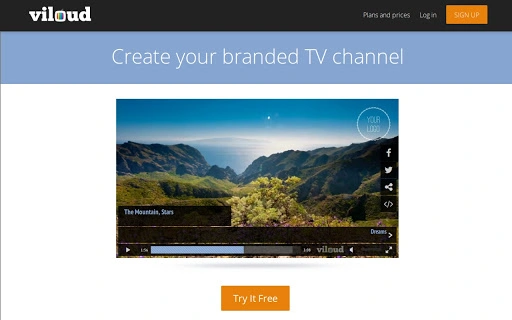
Description
Download Viloud – YouTube, Vimeo, HTML5 video, TV channel, Smart TV App
Overview
Viloud is a desktop software application designed to streamline video marketing by enabling users to create a fully branded TV channel from content sourced across multiple platforms. It supports integration with YouTube, Vimeo, and HTML5 video files, allowing seamless aggregation of multimedia assets into a unified streaming experience. The software is ideal for content creators, digital marketers, educators, and businesses aiming to boost website traffic through embedded video players and branded content delivery. By generating a dedicated URL for the channel, users can share their content widely, enhancing visibility and engagement. The tool also extends reach by enabling the creation of a Smart TV App, allowing content to be displayed on connected devices globally. This makes Viloud a versatile solution for organizations seeking to centralize video assets and distribute them across web and smart devices. While the developer has not provided additional background information, the software’s functionality suggests a focus on simplifying video content management and distribution. Real-world use cases include educational institutions delivering course materials, brands promoting product videos, and media outlets managing archives. The platform’s emphasis on branding and cross-platform accessibility positions it as a strategic tool for modern digital outreach.
Key Features & Capabilities
- Multi-Source Content Aggregation – Pull videos from YouTube, Vimeo, and HTML5 sources into a single, organized channel, reducing the need to manage content across separate platforms.
- Branded TV Channel Creation – Customize the look and feel of a TV channel with a unique logo, color scheme, and player design to align with brand identity.
- Embeddable Video Player – Generate a ready-to-use embed code to integrate the branded player directly into websites, increasing user engagement and site traffic.
- Dedicated Channel URL – Assign a unique, memorable URL to the channel for easy sharing across social media, email campaigns, and other marketing channels.
- Smart TV App Generation – Build a dedicated application for Smart TVs, enabling content delivery to a broader audience through connected devices worldwide.
- Centralized Video Management – Maintain a unified dashboard to organize, update, and monitor video content from diverse sources efficiently.
Practical Use Cases
For example, a university might use Viloud to compile lecture recordings from Vimeo and YouTube into a branded academic channel, then embed the player on its learning portal. A small business could aggregate product demo videos and customer testimonials, distribute them via a custom URL, and display them on Smart TVs in retail locations. Similarly, a content creator can unify their YouTube and HTML5 video uploads into one professional-looking channel, enhancing credibility and reach. The ability to generate a Smart TV App allows organizations to extend their presence beyond traditional web browsers, offering viewers a seamless experience on larger screens. These capabilities make Viloud a valuable asset for anyone aiming to centralize video content while maintaining brand consistency and maximizing audience access.
User Interface, Workflow & Performance
The user interface of Viloud is structured to support intuitive navigation, allowing users to import, organize, and publish video content with minimal technical expertise. The workflow begins with connecting content sources, followed by channel customization, and concludes with publishing the player or Smart TV App. The design emphasizes clarity and efficiency, with clearly labeled menus and logical progression through setup steps. Users can expect a streamlined experience when managing multiple video sources and applying branding elements. However, exact performance details were not specified by the developer. General software behavior patterns suggest stable operation under typical usage conditions, though actual performance may vary based on system configuration and video file complexity. Resource usage such as CPU and RAM consumption remains unspecified. No information was provided regarding stability during prolonged use or large-scale content processing. The developer did not specify resource usage details, so users should monitor performance based on their own system behavior. Overall, the interface appears optimized for usability, with an emphasis on minimizing friction during content aggregation and distribution tasks.
Compatibility & System Requirements
Viloud is available for Windows, Mac, and Linux operating systems, offering broad cross-platform accessibility. The installation size is 200 MB, indicating a moderate footprint suitable for most desktop environments. While the software is compatible with major desktop platforms, exact system requirements were not listed. This includes details on minimum processor speed, RAM, or graphics capabilities. The developer did not provide additional information on hardware compatibility or dependencies. Users should ensure their systems meet general standards for running desktop applications. Compatibility information was partially provided, leaving room for potential variations in performance across different devices. It is recommended to verify system readiness before installation. No specific version numbers were disclosed, so users should rely on the latest available build from the official source.
Pros and Cons
Pros
- Supports integration with YouTube, Vimeo, and HTML5 video sources
- Enables creation of a fully branded TV channel with custom design
- Offers embeddable video player for website traffic growth
- Generates a dedicated URL for easy sharing and branding
- Includes Smart TV App creation for global content delivery
- Available on Windows, Mac, and Linux platforms
- Free to download and use
Cons
- Exact system requirements were not specified
- Performance metrics and resource usage details are unavailable
- No information on update frequency or support channels
- Developer background not disclosed
- Platform-specific optimization details not provided
FAQ Section
Is Viloud compatible with Windows, Mac, and Linux?
Yes, Viloud is designed to run on Windows, Mac, and Linux operating systems, ensuring broad accessibility across different desktop environments.
Can I use Viloud to create a branded video player for my website?
Yes, Viloud allows users to generate a fully branded video player that can be embedded on websites to enhance content presentation and increase traffic.
Does Viloud support videos from YouTube and Vimeo?
Yes, the software supports content aggregation from YouTube, Vimeo, and HTML5 video files, enabling centralized management of video assets.
Is there a cost to use Viloud?
Yes, Viloud is available for free. There are no reported fees for downloading or using the core features of the software.
Can I distribute my content through a Smart TV App?
Yes, Viloud includes functionality to create a Smart TV App, allowing users to deliver their video content to connected devices worldwide.
Final Thoughts + CTA
Viloud stands out as a powerful, accessible tool for anyone looking to unify and brand video content from multiple sources. Its ability to create a customized TV channel, embed it on websites, and extend reach via a Smart TV App makes it a compelling solution for marketers, educators, and content creators. While some technical details such as system requirements and performance data are not publicly available, the software’s core functionality is clear and well-aligned with modern video marketing needs. The free availability across Windows, Mac, and Linux further enhances its appeal. For users seeking a straightforward way to boost website traffic and expand content visibility, Viloud offers a practical and scalable approach. Download Viloud now to start building your branded video presence today.
Guides & Tutorials for Viloud App for Chrome
How to install Viloud App for Chrome
- Click the Preview / Download button above.
- Once redirected, accept the terms and click Install.
- Wait for the Viloud App for Chrome download to finish on your device.
How to use Viloud App for Chrome
This software is primarily used for its core features described above. Open the app after installation to explore its capabilities.
User Reviews for Viloud App for Chrome 0
No reviews found





